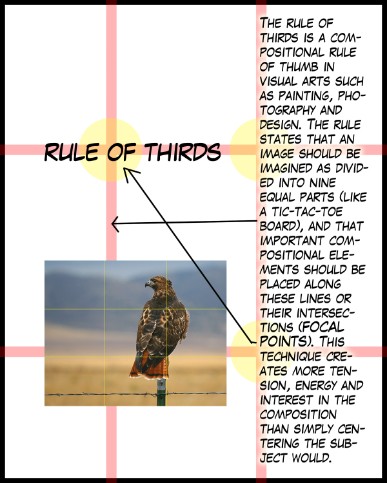
 | Lesson 1Make A POSTER!!!Using Photoshop, create a poster (8" x 10" 300dpi) advertising a new tech gadget that interests you.Use your knowledge of the rule of thirds and Photoshop to create an attractive poster.INCLUDE:- a photo or photos of the gadget- a brief write up of what your gadget does (SPELL CHECK!)- a website address to find out more! |
Lesson 2: Making a CD CoverYou have been hired for a exclusive design job and will be creating the cd cover for a brand new computer program! It is a top secret project and your design will introduce this product to THE WORLD (duh duh duuuuuuhhhh….).The visual elements should be appealing to young adults.Program choices:- FLASH GEN 2: An animation program (Not yet released)- PHOTOSHOP CS6 (Not yet released)- MICROSOFT OFFICE PLATINUM (Not yet released)- WINDOWS 8 (Not yet released)- UDK 3D HD (Not yet released)WHAT YOU NEED:a) a 12 cm by 12 cm coverb) a 12 cm by 12 cm back coverc) Title of your PROGRAMd) Graphic design relating to your programe) Bar codef) Priceg) Manufacturing Logo on front and back (Adobe, Microsoft, etc)h) A paragraph explaining the new features and a point form list of what the program can do!i) Save it as a PSD – show Ms. O for final proof readj) Think outside the box!!! | 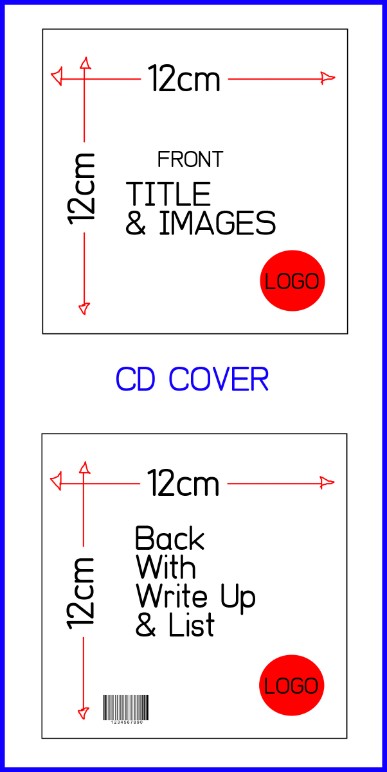 Save this in your drive! |
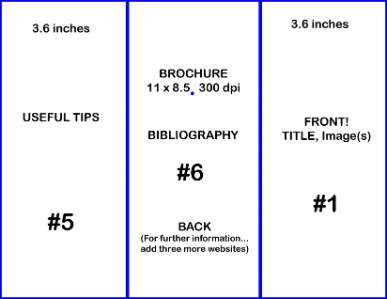 TEMPLATE GUIDELINES FOR THE BROCHURE ON PHOTOSHOP! 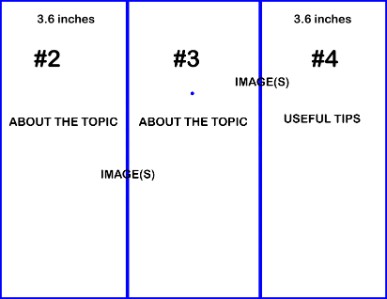 SAVE THESE IN YOUR DRIVE ASbrochure 1 yourname.psd brochure 2 yourname.psd | LESSON 3: The BROCHUREYou may do this in PHOTOSHOP or PUBLISHER
TOPICS: FACEBOOK TWITTER ERGONOMICS PUBLISHER GOOGLE YOUTUBE NETIQUETTE POWERPOINT OPEN OFFICE WORD GOOGLE CLOUD CHOOSE 1 TOPIC (Everyone must have a different topic)
You will be creating a brochure about one of the above topics. Using your GOOGLE search engine skills, you will research your topic. You should have at least three different websites as references. It will be on two different documents 11 x 8.5 300 dpi You will need: a) A cover – with title, and image(s) b) Section 2 – a brief history of your topic… (Facebook was founded by Mark Zuckerberg in 2004) (with an image?) c) Section 3 – a summary of how your topic applies to today’s computer using young people (with an image?) d) Section 4 – useful tips about your topic. Consider adding a diagram. e) Section 5 – more useful tips about your topic f) Section 6 – a bibliography (by section) and three MORE websites for further information.
|
