OPEN OFFICE INTRO - THE VIDEOLESSON 2 - The Business LetterWrite a business letter to Disney Pixar. Based on the template.Lesson 3 - FirstClass Tips and Tricks - Lecture and DemoLesson 4 - "Net Speak"Read the article on "Net Speak." Make a poster on Photoshop about "Net Speak" 8" x 10" 300 dpi - using your favourites and the translations (BE POLITE!!!).Lesson 4 - NetiquetteRead the above link on Netiquette.Compose three FirstClass emails using the Rules of Netiquette. Spell check everything! a) To Mike asking about Netiquette - informal but polite(cc: Ms O) b) To Ms. O asking about a missed assignment - as student to teacher (cc: Mike) c) To Ms. O and Mike asking about a job opportunity in our Graphic Design Company - as a formal letter |   |

| Lesson 5 - Formatting a News ArticleIn Open Office or Word Perfect: a) Write a news report on a GEEKY NEWS ITEM b) FORMATTING: Title for your articleSubtitleBy: Author THREE COLUMNS At least TWO IMAGESALL WEBSITES USED |

EXCEL-ERATE YOUR...WORK!LESSON 1 - LESSON LINKMaking simple addition table. LABEL THE CHART! - Make a class list of 5 people.- Put in 5 test scores.- Total the scores. =**+**+**+**+**- Find the average using the formula = **/5LESSON 2LESSON LINKCREATING A CALENDAR CHART and A GRAPHBuilding on what we learned in Lesson 1, you will create an annual sales chart and graph for your Company. Be creative. Sell three things.LESSON 3:
|   |

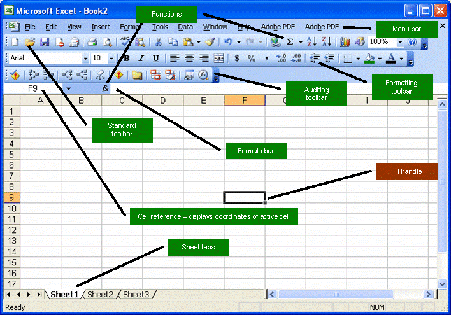
Watch the Powerpoint and answer the following questions. Use what you know as well!Tutorial Activity 1. When should you use Excel instead of Word, and vice versa? 2. What is a selection of multiple cells referred to as? 3. How do you insert a row or a column? 4. How do you delete an entire row or column? 5. How can you change the size or a row or column to fit the information contained in it? 6. List 2 things you should NOT do when deleting data. 7. How should numbers be formatted? 8. What sign must formulas always begin with? 9. How do you perform a “quick-sum”? 10. List 2 useful tips for printing in Excel.
|  |
LESSON 4LESSON LINKFollow along with the Tutorial. Save in SHARED --> 000Computers --> Your File as "Rentals" LESSON 5Open the file from yesterday "rentals" and continue with the tutorial.LESSON LINKSave in SHARED --> 000Computers --> Your File as "Rentals" |  |
BTT COMPANY PRESENTATIONS 1. The TASK Video Game Company Powerpoint: NAME: Company: ORAL PRESENTATION: (T/I) Your slides make sense for the presentation and Company (C) You communicate well about the company orally (A) Slides Have Images, Information and a Bibliography that apply to the company You will complete a rubric for yourself and for your peers. Be honest.
|
